

I’ve never used ClassDojo in my classroom, as I teach upper primary and I think ClassDojo is better suited for lower primary/elementary. However, the teacher I work with has said that it’s not a magic wand (spoiler: nothing is), it does offer some useful tools for managing classroom behaviour, boosting student engagement, and building strong parent communication.
What Is ClassDojo?
ClassDojo is a classroom management tool. You can award students points for good behaviour, communicate with parents, share classroom stories, and build student portfolios. Students, teachers, and families can access the Dojo on computers, tablets, and phones.
Ease of Use
Setting up ClassDojo is quick and easy. It takes maybe 10 to 15 minutes to set up your class and assign students their avatars.
The interface is user-friendly and kids pick it up immediately (especially with the cute monster avatars), and even the less tech-savvy parents usually have no trouble navigating it.
Once it’s set up, it takes seconds to award points, send messages, or post updates. You can use it throughout the day or just check in at key times (transitions, pack-up, etc.).
Student Engagement
Kids love ClassDojo. The personalised avatars create buy-in, but it’s the instant feedback from points and the class leaderboard that really hooks them. Teachers have seen the most reluctant learners perk up when they earn a “Helping Others” or “On Task” point. I have even seen teachers have ClassDojo on their board all day, showing the points increase or decrease throughout the day. Clever.
You can tailor the point system to your values (academic, social/emotional, or behaviour specific goals) so it stays relevant no matter your class culture or classroom rules.
Parent Communication
This is where ClassDojo really shines.
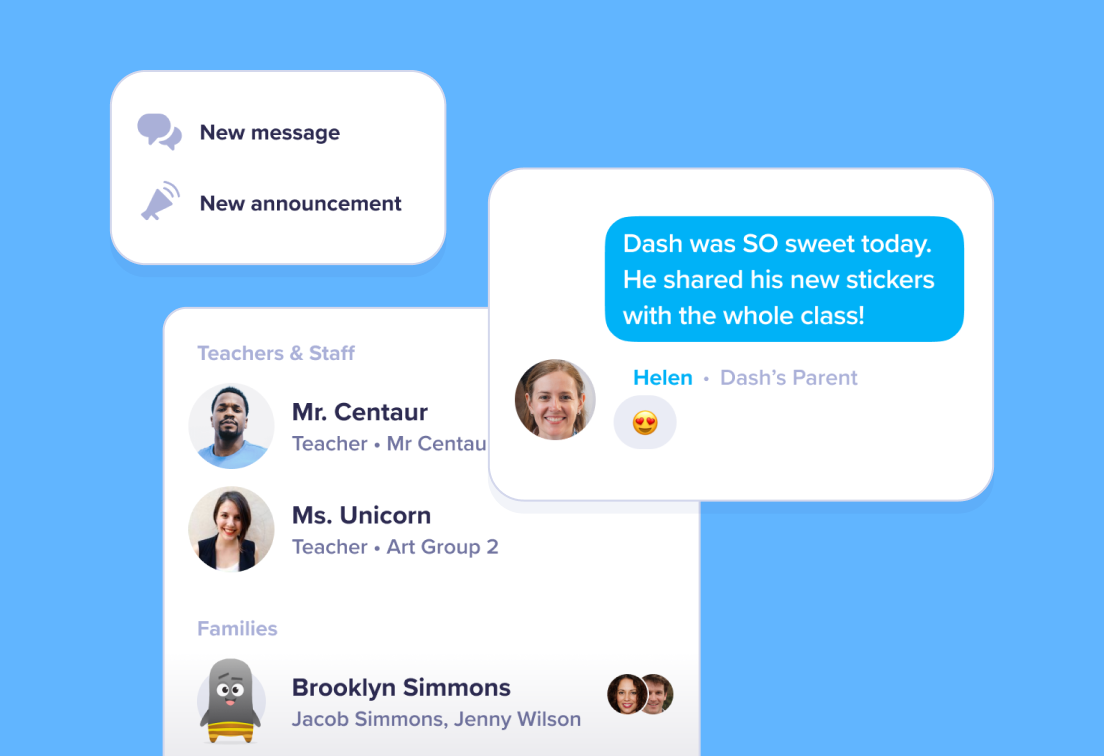
- ClassDojo is similar to SeeSaw. You can message parents individually or in groups.
- “Stories” let you post photos and updates like a private classroom Instagram account.
- You can see who’s viewed posts or read messages (no more “I didn’t get the newsletter” excuses.)
Student Portfolios
Students can upload photos, videos, drawings, and journal entries into their own ClassDojo portfolios. Teachers have to approve everything before it goes live, so you will maintain control over what’s shared. Use it for:
- Documenting growth over time
- Sharing student work with parents
- Encouraging reflection and ownership
It’s kid-friendly enough that young learners can upload independently after a quick demo.
Differentiation Opportunities
While ClassDojo doesn’t directly offer tools for differentiated instruction like some learning platforms, however, you can use it to support differentation through:
- Customised behaviour goals: You can set individualised point targets for different students.
- Private communication: You can give quiet praise or specific feedback to students (and their families) without putting them on blast in front of the whole class.
- Portfolios: Students can work at their level and showcase their learning in a format that suits them (drawing, voice recording, writing, etc.).
Integration with Other Tools
ClassDojo is not a full-blown LMS, but it plays well with others. You can:
- Upload files from Google Drive
- Embed video from YouTube or Google Classroom
- Use it alongside platforms like Seesaw or Google Classroom without redundancy
It’s flexible enough to be a companion tool rather than a substitute, especially if you’re already using tech in your classroom.
Pricing
The basic version of ClassDojo (which includes behaviour tracking, messaging, Stories, and portfolios) is 100% free for teachers and families, the way we like it.
If you want to take things further, you can upgrade to ClassDojo Plus. But, this version is aimed more at parents and not teachers. Parents pay for extra features like behaviour trends and goal setting at home.

Pros and Cons
Pros
- Super easy to use and quick to set up
- High student engagement (especially in lower grades)
- Great parent communication features
- Free for teachers
- Encourages positive behaviour with instant feedback
- Supports digital portfolios with student ownership
- Works across all devices
Cons
- Limited direct instructional (no quizzes, lessons, etc.)
- Student points reset unless you export data manually
- Can create behaviour “competition” if not managed carefully
- No detailed progress tracking like in full LMS platforms
- Some parents find the Plus upsell confusing
Alternatives
Seesaw
Seesaw is a more comprehensive tool for portfolios and assignments. It allows students to complete work inside the platform and submit it. Communication tools are built-in, and it works really well for student reflection and differentiation. Ideal if you’re looking for a more academic-focused platform with similar ease of use. However, you will lose the class points system, which can impact behaviours.
ClassTag
ClassTag is free, but many of its advanced features are part of paid plans. It’s built for family communication and can auto-translate messages into dozens of languages. It includes calendar integration, volunteer sign-ups, and behaviour tracking. It’s particularly good if you want deeper parent engagement or run a very involved classroom.
ClassDojo isn’t perfect, but for primary/elementary teachers looking to build classroom community, reinforce positive behaviour, and keep families in the loop, it’s hard to beat. It’s low-effort, high-impact, and doesn’t cost a cent.
If you’re already juggling a dozen apps and want something clean, simple, and effective to manage behaviour and connection, ClassDojo’s worth a shot. Just keep in mind it’s a tool and not a teaching strategy. How you use it will make all the difference.
